
A keymap for 34 keys with 4 layers and no mod-tap.
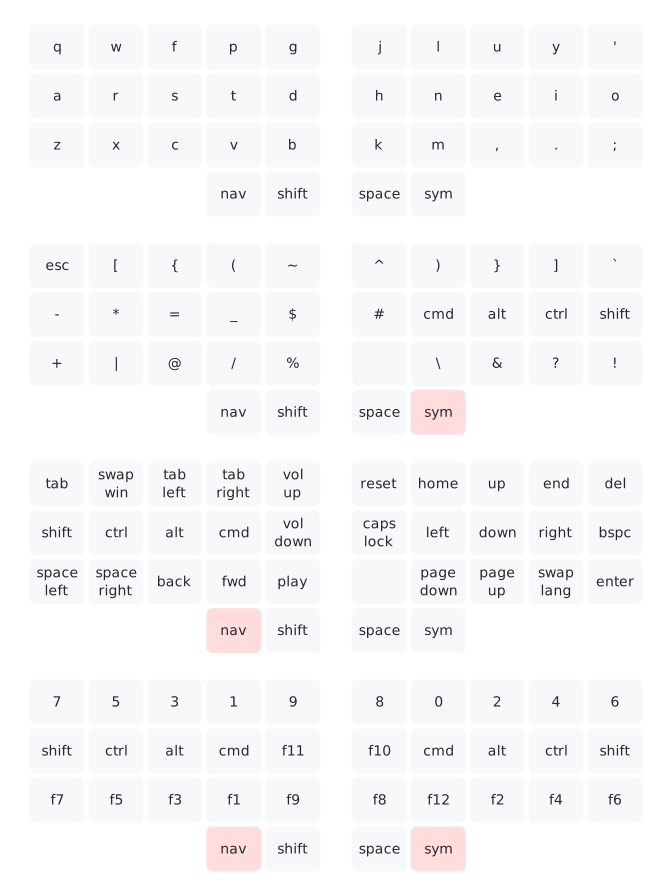
Details
- Hold
symto activate the symbols layer. - Hold
navto activate the navigation layer. - Hold
symandnavtogether to activate the numbers layer. - The home row modifiers are oneshot so that it’s possible to modify the keys on the base layer, where there are no dedicated modifiers.
swap winsendscmd-tabfor changing focus in macOS but holdscmdbetween consecutive presses.swap langbehaves similarly but sendsctrl-space, for changing input language in macOS.
Oneshot modifiers
The home row modifiers can either be held and used as normal, or if
no other keys are pressed while a modifier is down, the modifier will be
queued and applied to the next non-modifier keypress. For example to
type shift-cmd-t, type sym-o-n (or
nav-a-t), release, then hit t.
You can and should hit chords as fast as you like because there are no timers involved.
Cancel unused modifiers by tapping nav or
sym.
Userspace oneshot implementation
For my usage patterns I was hitting stuck modifiers frequently with
OSM (maybe related to
#3963?).
I’d like to try to help fix this in QMK proper, but implementing oneshot
mods in userspace first was:
- Fun.
- A good exploration of how I think oneshot mods should work without timers.
So in the meantime, this userspace oneshot implementation is working well for me.
Swapper
swap win sends cmd-tab, but holds
cmd between consecutive keypresses. cmd is
released when some other key is hit or released. For example
nav down, swap win, swap win, nav up -> cmd down, tab, tab, cmd up
nav down, swap win, enter -> cmd down, tab, cmd up, enter
swap lang sends ctrl-space to swap input
languages in macOS and behaves similarly.
Why no mod-tap?
Mod-tap seems to be by far the most popular tool among users of tiny keyboards to answer the question of where to put the modifiers, and in the right hands it can clearly work brilliantly, but I’ve always found myself error prone and inconsistent with it.
With dedicated modifiers, there are three ways one might type
ctrl-c:
ctrl down, ctrl up, c down, c up
ctrl down, c down, ctrl up, c up
ctrl down, c down, c up, ctrl up
Basically, you never have to worry about the keyups, as long as the
keydowns occur in the correct order. Similarly, there are three ways one
might type ac:
a down, a up, c down, c up
a down, c down, a up, c up
a down, c down, c up, a up
Replace a with ctrl and this is exactly
what we had before! So if we want to put a and
ctrl on the same key we have a problem, because without
considering timing these sequences become ambiguous. So let’s consider
timing.
The solution to the ambiguity that QMK employs is to configure the
TAPPING_TERM and consider a key held rather than tapped if
it is held for long enough. My problem with this is that it forces you
to slow down to use modifiers. By its very nature the tapping term must
be longer than the longest you would ever hold a key while typing on the
slowest laziest Sunday afternoon. I’m not typing at 100% speed at all
times, but when I am, having to think about timing and consciously slow
down for certain actions never fails to trip me up.
So alas, mod-tap is not for me – but if it works for you, more power to you. :)